➕ Custom Fields Setup🔗
1️⃣ Collecting guest and order data🔗
Additional fields help collect important information from guests: date of birth, table number, delivery notes, and more ℹ️
This allows you to make the service more convenient, personalize offers, and automate processes.
2️⃣ Where can additional fields be configured?🔗
Additional fields can be configured:
🔹 in the user profile (в профиле пользователя)
🔹 in the cart (в корзине)
3️⃣ Examples of fields in the user profile🔗
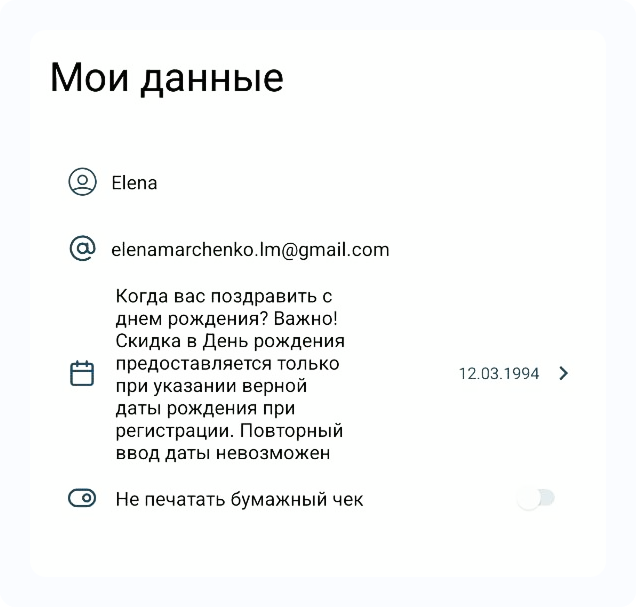
- Date of birth
- Gender
- Other parameters upon request
Important 📌
- Fields can be required or optional
- The field «Gender» does not pass AppStore/GooglePlay review, so it is better to enable it after the app is published
4️⃣ Examples of order-related fields🔗
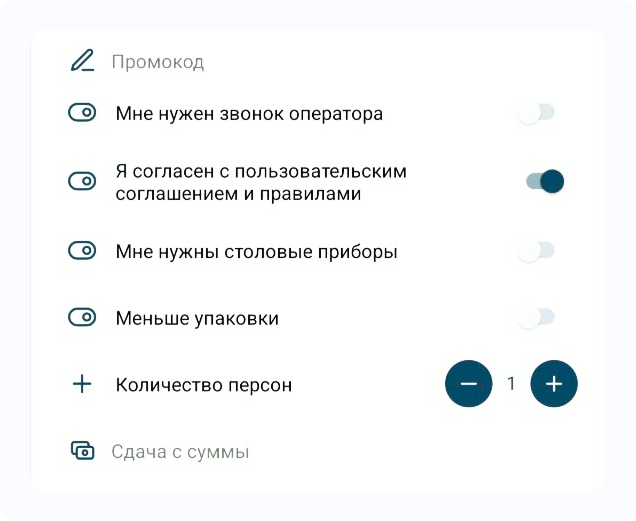
- Change from (for cash payments)
- Call me
- Number of guests
- Table number
- Car number
- and much more
🧩 Fields can be configured based on conditions:
- by payment type (cash, card, etc.)
- by order type (dine-in, delivery, pickup)
Examples:
- «Change from…» — only for cash payments
- «Pack it?» — only for pickup
- «Table number» — only for dine-in orders
5️⃣ Field types🔗
| Field type | Example of use |
|---|---|
| Promo code | Integration with promotions or simple text input field |
| Text | Car number, Allergy |
| Number | Number of guests |
| Yes / No | Switchers: “operator call required”, “as soon as possible”, “pack it” |
| Option selection | Packaging: eco / plastic / festive etc. |
6️⃣ Important to know🔗
Not all fields can be integrated with the cash system ⚠️
If you have integration with iiko or another POS system:
- Some data is transferred to the system (for example, number of guests)
- The rest is added as a technical comment to the order
Do not overload the interface ⛔
Each additional field is a step where a guest might drop out of the funnel.
7️⃣ Which fields work with integration?🔗
Transferred from profile:
✅ Name
✅ Phone number
✅ Date of birth 🎂
✅ Email 📧
It is also possible to transfer 🚻 Gender if supported by your system.
Transferred from cart:
✅ Change from ✅ Number of guests ✅ Promo code
Other fields are transferred as a comment to the order if the guest filled them in the cart.
👉 To уточнить which fields are available in your integration, contact support
👉 https://t.me/RBCNbot
8️⃣ Where do the fields work?🔗
✅ In all launched RBCN products
9️⃣ Implementation recommendations🔗
| Field | Comment |
|---|---|
| Change from | Reduces the number of conflicts with couriers |
| Birthday | Required if you offer birthday gifts or promotions |
| Allows sending receipts by email (if you use iiko + Atol/Shtrih). Everything you need to know about fiscalization is described here 👉 🧾 Online payment fiscalization | |
| Operator call required | Not everyone will choose it — can reduce confirmation workload |
| Table number | Especially useful if guests can order directly from the table — increases loyalty |
Have questions?
If you want to add fields or are unsure how best to configure them —
✍️ contact support 👉 https://t.me/RBCNbot
or reach out to your personal manager.