💬 Order History Screen: Reviews, Tips and Additional Actions🔗
The Order History screen is more than just a list of past purchases 💡
It is a powerful tool for collecting feedback, increasing loyalty and offering new interactions.
💬 Post-Order Reviews🔗
After each order, a guest can:
🔹 Rate food quality and service
🔹 Leave a comment
🔹 Receive a PUSH notification asking to rate the order
⚙️ How It Works🔗
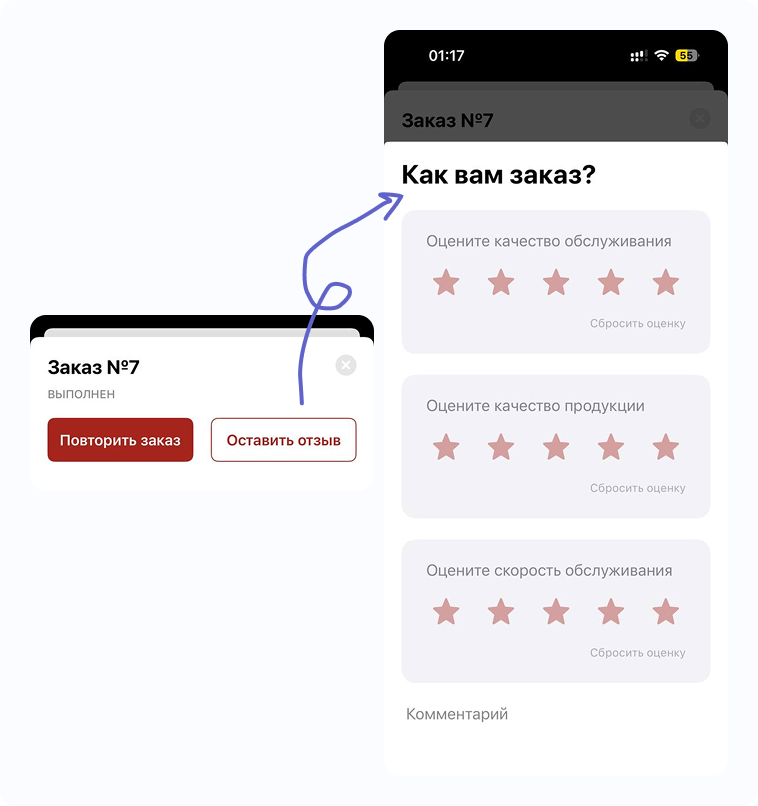
- The notification is sent X minutes after the order is closed (configurable)
- Rating fields are customizable: by default, food, service and a general comment are rated, but you can show any two questions and add an optional third one
- Reviews are sent to the email specified during setup (the same one shown in the “About Company” section) and can also be duplicated to Telegram
- PUSH will not be sent if the guest has not granted notification permission
- Review emails are unified for the entire app (not separated by venue)
📌 Important!
The notification is triggered some time after the order is closed. If:
- The order is closed too early (for example, before delivery);
- Or statuses from iiko/frontpad/sbis are delayed —
The PUSH may be sent before the guest receives the order or even at night 💤
👉 In such cases, we DO NOT recommend enabling this feature without testing.
🧪 Before launch — test carefully and confirm activation.
🤖 Pyrus Integration🔗
Reviews can be automatically duplicated to https://pyrus.com/t#inbox (if you use it).
You can assign tasks to employees so that every review is processed.
💡 A great solution for chains and structured quality control!
📲 Telegram Reviews: Real-Time Response🔗
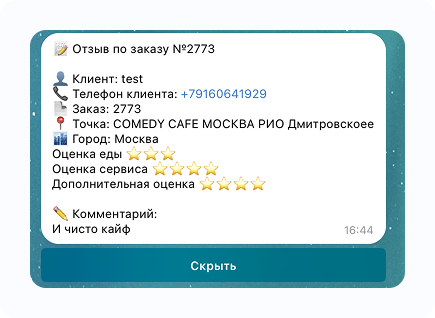
We can duplicate every review to the Telegram bot that sends order notifications.
What appears in Telegram:
- ⭐️ Ratings
- 💬 Comment
- 📞 Clickable guest phone number
💥 Why does it work?
📊 We recorded:
If a real employee calls back within 30 minutes after a negative review (no automated scripts or bots!) — 85% of such guests place another order within a month 🤝
📌 Even a simple apology and attention is often enough. Bonuses are not required.
📲 Want to enable Telegram duplication?
💬 Contact Support
💸 Tips — Through Your Own System🔗
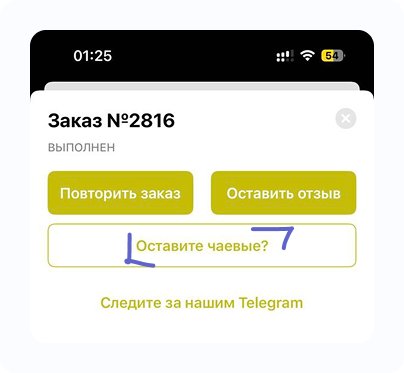
We do not limit you to a single solution.
Each client may use their own tipping system. Therefore:
- You provide us with a link to your tipping page (for example, CloudTips, Tipsi, Tocha, etc.)
- We add the link to the order history screen
- 🧠 Configuration by venue or order type is possible
🪙 The guest sees a button, taps it and leaves a tip in a convenient format.
➕ Additional Button🔗
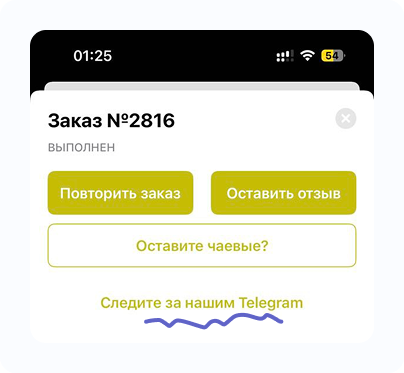
Want to add something else?
We can add an additional button to the order history screen.
It can be anything:
- 🔗 Link to your Telegram channel
- ⭐️ Invitation to join a club
- 🎁 Promo campaign
- 📝 Feedback form
- 🧠 Or something unique to your business
📩 Just contact support 👇
🧾 Summary🔗
The “Order History” section is:
✅ Convenient feedback tool
✅ Ability to respond quickly
✅ Increased repeat orders
✅ Customizable actions: tips, buttons, links
If you would like to enable any of these features — ✍️ simply contact our support team.